
Trying to get the duration of videos in a folder
I have an script to get the duration of all .mp4 and .mvk files and sum it to get the total time of the folder, I do this using ffprobe but could I do it with go?
tl;dr: no, I’m not that good and I should use the tools that are available.
Step 1: get duration with Go
So I’m not good with go but I like the language and I will try to use it, first problem is… how do you get the duration of a file?, after a quick search most of the sites said that I better use ffprobe like how I’m doing with my script but I really want to do it myself, still my plan B is just calling ffprobe from go if I can’t really do it or if my solution is slower that ffprobe.
I searched for the technical specifications of mp4 files and started reading ISO 14496-14 but didn’t find an specific way to calculate the duration so I changed to ISO 14496-12 and found that the box mvhd has ‘duration’ and ‘timescale’ so should I just multiply them and be happy… right?, well no, first of all you need to find the box and for that I’m reading the file byte by byte and when I found the ’m' rune I try to check if ‘vhd’ is next (the box names are just characters in the file so at least I can do this).
After finding the mvhd box I need be careful reading the information because boxes can have different sizes depending of some variables, for example if the file is too big some variables are stored in 64 bits instead of the default 32 bits, I think most of my videos should be small but I don’t want to break the script so easily.
Here is a simple diagram of what I need to read in the file after finding the mvhd identifier:
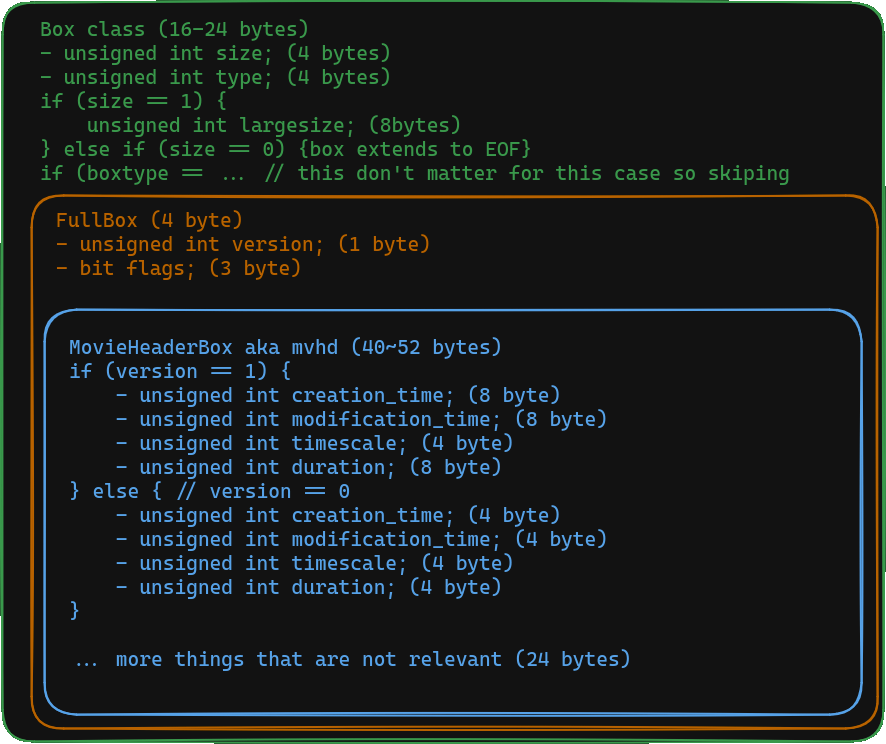
*: Box class can be bigger but only for uuid so we are not missing much
MovieHeadBox extends FullBox which extends Box, so after finding the box name I need to:
- Move 8 bytes backward to be able to read ‘size’
- Check size and skip bytes until FullBox starts
- Read 1 byte and skip 3 bytes
- Check if ‘version’ is 1 or 0
- Read the necessary information
And with a simple example file I got:
$ time ./goDuration
5
./goDuration  0.20s user 0.44s system 100% cpu 0.640 total

$ time ffprobe -v error -show_entries format=duration -of default=noprint_wrappers=1:nokey=1 -sexagesimal Video.mp4
0:00:05.672333
ffprobe -v error -show_entries format=duration -of -sexagesimal Video.mp4  0.08s user 0.02s system 98% cpu 0.102 total
After checking that the logic works for mp4 files I tried with a folder with real videos and… well:
time ./goDuration
^C
./goDuration  85.22s user 191.78s system 102% cpu 4:31.42 total

time ./duration.sh # using ffprobe
Time used: 4:12:17
./duration.sh  0.51s user 0.13s system 97% cpu 0.651 total
So after 4+ minutes my code was not able to give a response when ffprobe give it to me in less than 1 second. I think the prime subject is having to read all the file until I find the string ‘mvhd’, ffprobe has to do something more clever that I’m not aware, because I didn’t read all the box types in the ISO specification. Also maybe I’m not using the best methods to find the files and parse them.
So after learning a nice amount of how mp4 works and having my solution be incredible slow I will just call ffprobe inside go this has pros and cons:
- Pros
- Cleaner code
- Faster
- Can work with other video formats
- Cons
- You need to have
ffprobeto work, which is not much to be honest
- You need to have
-> Absolutely ignore mvk since reading the mp4 specification what hard enough.
Step 2: just call ffprobe man
This step was really fast, removed some parts that I really don’t need, call the “already invented wheel” and this is the comparison:
$ time ./goDuration
Total duration: 4h12m17s
./goDuration  0.66s user 0.16s system 94% cpu 0.860 total

$ time ./duration.sh
Time used: 4:12:17
./duration.sh  0.77s user 0.19s system 97% cpu 0.977 total
I could better test this with multiple runs, better testing files and more but for my small use case I don’t think is needed also this is not thought to be widely use. I could add this executable to my $PATH and I would not need to move my bash script to other folder (yes I could do this script better)